
Module 4A: ISO, f/stops, and Shutter Speed
 A. ISO, f/stops, and Shutter Speed
F-stops
The f-stop, or aperture is the control in the lens that opens up or closes/stops down the diaphragm inside as a way to control the amount of light that reaches the film or sensor. These are often referred to as whole or half-stops. The whole stops are indicated below:
1.4 2 2.8 4 5.6 8 11 16 22 32

The smaller the F number, the larger the lens opening.
The larger the F number, the smaller the lens opening.
The f-stops on your lenses may not be numbered the same as these, but they will be close. These are considered whole stops. You can set up your camera to also show half stops or 1/3 stops between each of these whole stops.
As a photographer, you should commit the listed f-stops, in order, to memory. Memorize the numbers as they are listed rather than those on your lens.
A large lens opening, such as F2.8, will let more light reach the sensor than a small lens opening such as F22. There is a relationship between each of the f-stops:
Any time you move your lens from one F number to the next smaller F number,
the amount of light that reaches the film DOUBLES.
EXAMPLE:
f/5.6 allows twice as much light to reach the sensor as f/8.
f/4 allows twice as much light to reach the sensor as f/5.6.
This pattern is the same throughout the apertures.
If the f-stop is stopped down:
Moving the lens from f/5.6 to f/8 reduces the amount of light reaching the sensor by half!
Moving the lens from f/4 to f/5.6 reduces the amount of light reaching the sensor by half!
And this pattern continues.
1.4 - 2 - 2.8 - 4 - 5.6 - 8 - 11 - 16 - 22 - 32...
Larger Openings <-------------> Smaller Openings
More Light Reaches the Film <-------------> Less Light Reaches the Film
Move One F-stop, Light Doubles <--------------> Move One F-stop, Light is cut in half
Changing the lens opening from one f-stop to the next will either double the amount of light that reaches the film or cut it in half, depending on which way you move it.
Shutter Speeds
The shutter speed controls the amount of light that reaches the sensor by determining how long the shutter remains open. Memorize these shutter speeds:
...1sec. - 1/2 - 1/4 - 1/8 - 1/15 - 1/30 - 1/60 - 1/125 - 1/250 - 1/500 - 1/1000 - 1/2000...
Notice that shutter speeds continue in both directions. Also note that we go from 1 second to 1/2 second. Your camera will not show these speeds in fraction form. When you look at your shutter speed dial and it says 500, it means that it is 1/500th of a second!
The smaller the shutter speed number (1/1000), the faster the shutter.
The larger the shutter speed number (1/2), the slower the shutter.
A fast shutter speed allows less light to reach the sensor than a slow shutter speed.
More light reaches the sensor during 1/2 second than 1/1000th of a second.
Shutter speeds have the same relationship to each other as the f-stops do in that when you move from one shutter speed to the next, you either double the amount of light that reaches the sensor, or you cut it in half.
EXAMPLE:
Move from 1/250 to 1/125 and the amount of light reaching the sensor doubles.
Move from 1/30 to 1/15 and the amount of light reaching the sensor doubles.
The pattern continues.
If you close down the shutter:
Move from 1/30 to 1/60 and the amount of light reaching the sensor is cut in half.
Move from 1/500 to 1/1000 and the amount of light reaching the sensor is cut in half.
The pattern continues.
...1sec. - 1/2 - 1/4 - 1/8 - 1/15 - 1/30 - 1/60 - 1/125 - 1/250 - 1/500 - 1/1000 - 1/2000...
Slower Speeds <----------> Faster Speeds
More Light Reaches Sensor <----------> Less Light Reaches Sensor
Move One F-stop, Light Doubles <--------------> Move One F-stop, Light is cut in half
Changing the shutter speed from one to the next will either double the amount of light that reaches the sensor or cut it in half, depending on which way you move it.
ISO
The ISO number is a way of rating a sensor's (or film's) sensitivity to light.
The higher the ISO number, the more light-sensitive the sensor is.
The smaller the ISO number, the less light-sensitive the sensor is.
The lower ISOs such as 100 and 200 are the least sensitive to light, so they are often used outside during daylight or indoors with a flash.
The higher ISOs such as 400 and 800 and higher, are increasingly light-sensitive and are capable of recording images in low-light situations such as indoors with no flash or even outside at night.
ISOs have the same relationships to each other as do f-stops and shutter speeds in that moving from one ISO to another effectively doubles the senor’s sensitivity to light or cuts the sensitivity in half.
200 ISO is twice as sensitive as 100 ISO.
400 ISO is twice as sensitive as 200 ISO.
It is important to use the right ISO for the lighting conditions under which you are working. Higher ISOs may result in images that are less sharp. Higher ISOs also increases the likelihood of introducing digital noise to your images. These issues will become more apparent as you begin to enlarge your images. These imperfections may appear as pixilation (jagged edges), graininess or digital artifacts.
Changing the ISO setting on the camera recalibrates the in-camera meter to reflect the exposure values at the given ISO.
The ISO setting is the basis on which all exposures are calculated. Exposures are expressed with a f-stop and a shutter speed and must also include an ISO to be relevant.
Exposure
The basics of photography begin with correctly exposing the sensor with the right combination of
f-stop and shutter speed at a given ISO. While not really a true algebraic equation, exposure can be expressed in this formula:
Exposure = INTENSITY @ TIME
or, E = IT
“E” will represent the amount of light that reaches the sensor.
“I” (intensity) will represent the f-stop
“T” (time) will represent the shutter speed.
We can plug-in some numbers just to see what happens: E = f/8 @ 1/125
(f/8 and 1/125 are variables selected entirely at random for this example.)
Because there is an = in the equation, the variables can change, so long as the final result, “E”, stays consistent.
In the example, E = f/8 @1/125. If you wanted to change from f/8 to f/5.6, that would be acceptable as long as the amount of light that reaches the sensor remains equal!
When we move from f/8 to f/5.6, we are opening the lens by one stop which allows twice the amount of light reach the sensor. For our equation to remain equal, we have to reduce the amount of light reaching the sensor by half. This will be accomplished by moving the shutter speed to the next faster speed.
E = f/8 @ 1/125
and
E = f/5.6 @ 1/250
f/5.6 @ 1/250 is an equivalent exposure to f/8 @ 1/125 because in both cases, the exact amount of light reaches the sensor. In fact, there can be many equivalent exposures:
f/22 @ 1/15
f/16 @ 1/30
f/11 @ 1/60
f/8 @ 1/125
f/5.6 @ 1/250
f/4 @ 1/500
f/2.8 @ 1/1000
Each of the above exposures yield the exact amount of light onto the sensor.
This process is the same no matter which f-stop and shutter speed combination you choose to start out with. The hard part about exposure is figuring out which f-stop and shutter speed to start with in the first place. (We will cover this in-depth later.)
The ability to work through the equivalent exposures to select a desirable f-stop or shutter speed combination is what gives the photographer the power to “create images” rather than simply “take pictures” as we will soon see.
Depth of Field and Exposure
F-stops not only control the amount of light that reaches the film, but they also control depth of field.
The larger the lens opening, the shallower the DOF.
The smaller the lens opening, the greater the depth of field.
Since larger lens openings provide a shallower DOF, the photographer may wish to select an exposure that utilizes a large lens opening to create an image where the background is de-emphasized creating stronger attention on the subject.
Using the examples on the previous page, we came up with a list of equivalent exposures:
f/22 @ 1/15
f/16 @ 1/30
f/11 @ 1/60
f/8 @ 1/125
f/5.6 @ 1/250
f/4 @ 1/500
f/2.8 @ 1/1000
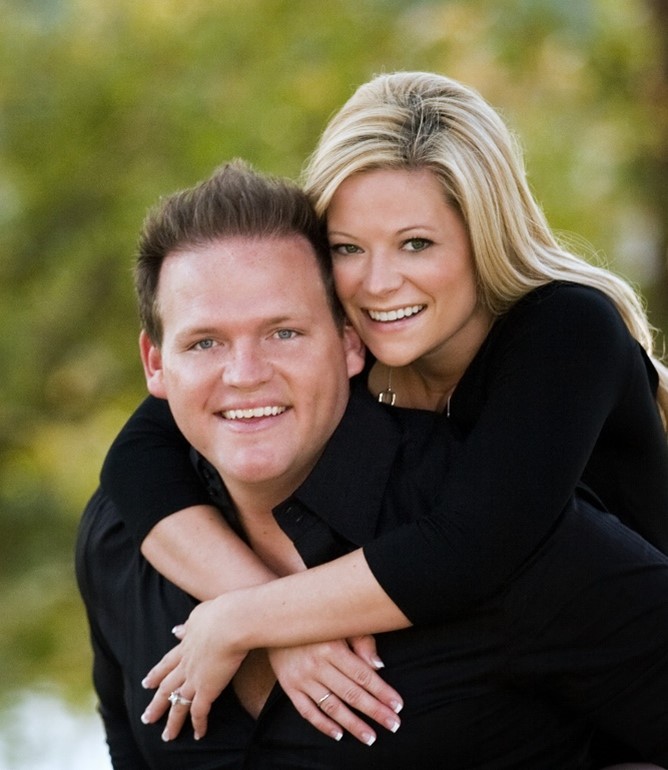
Of these choices, f/2.8 @ 1/1000 will provide an image with the shallowest DOF.
The image below was taken with a 200mm lens at f/2.8 to minimize the DOF and make the background quite out of focus.
If the priority is to record the background as sharp, the best choice is f/22 @ 1/15.
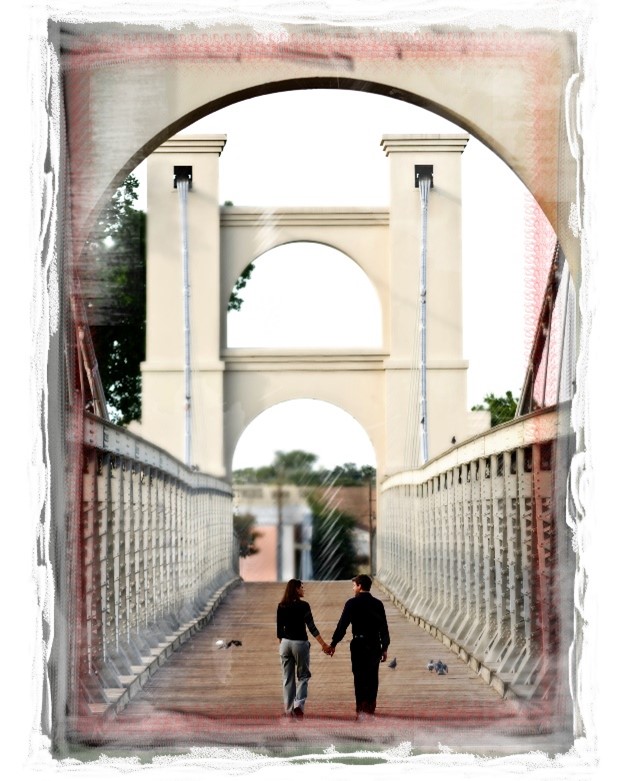
The above image was done with a 200mm lens at f/16 to ensure the entire bridge is rendered as relatively sharp.
Camera-to-subject distance and the focal length of the lens has a huge impact on how depth of field is recorded, but when it comes to determining exposure, you should select the appropriate f-stop to further accentuate your desire for background and foreground sharpness or lack of sharpness.
Controlling Motion
Shutter speeds not only control the amount of light that reaches the sensor, but they also control the apparent movement of objects in motion during the exposure.
Objects that are moving during the exposure will appear almost stationary at fast shutter speeds and may record as a blur during longer shutter speeds.
Fast Shutter Speed
This image was taken at f/2.8 @ 1/250.
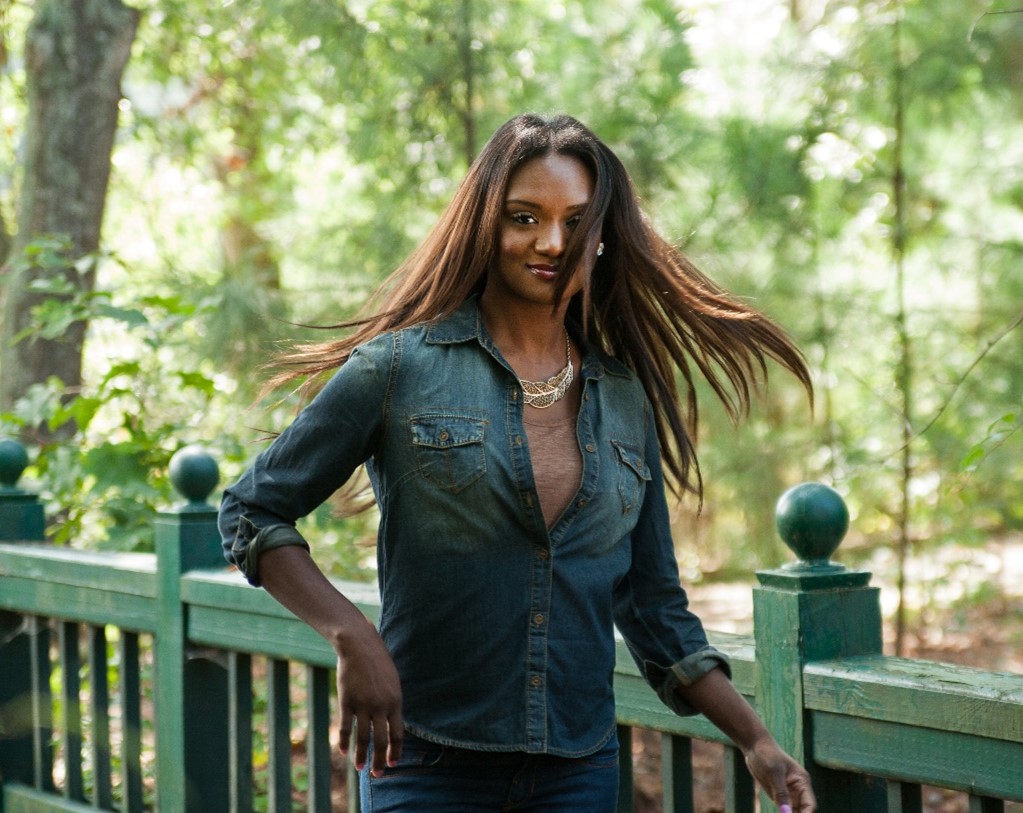
Notice how the fast shutter speed arrested the movement of her hair.
Slow Shutter Speed
This image was taken at f/8 @ 1/30.
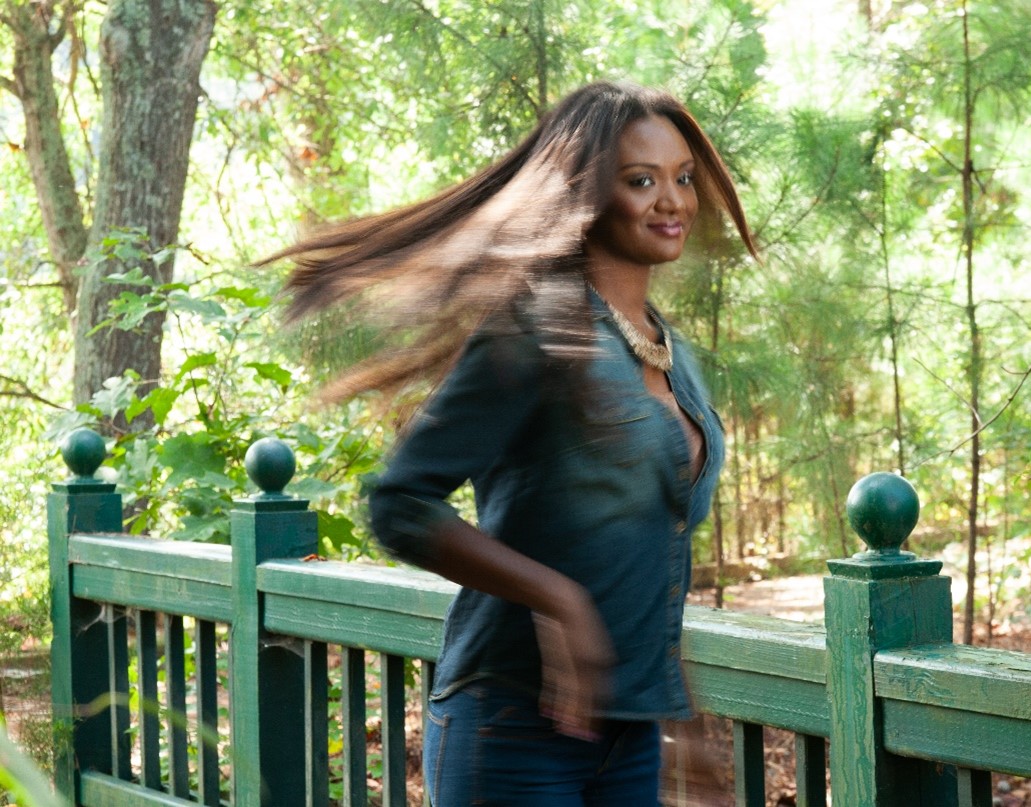
Notice how the slow shutter speed recorded the movement of her hair and her arm.
Motion and Exposure
We have already seen that shutter speeds not only control the amount of light that reaches the film, but they also control motion.
Since faster speeds tend to arrest motion, the photographer may wish to select an exposure that utilizes a faster speed to create an image that records a moving subject with a high degree of sharpness. The tendency to freeze a moving subject is dependent on how fast the subject is moving, how close you are to the subject, and the focal length of the lens. The ability to arrest the movement of a moving subject increases as the shutter speed increases.
Which one of these equivalent exposures would provide the best chance of freezing a moving subject?
f/22 @ 1/15
f/16 @ 1/30
f/11 @ 1/60
f/8 @ 1/125
f/5.6 @ 1/250
f/4 @ 1/500
f/2.8 @ 1/1000
Of these choices, f/2.8 @ 1/1000 will provide the best chances of freezing a moving subject.
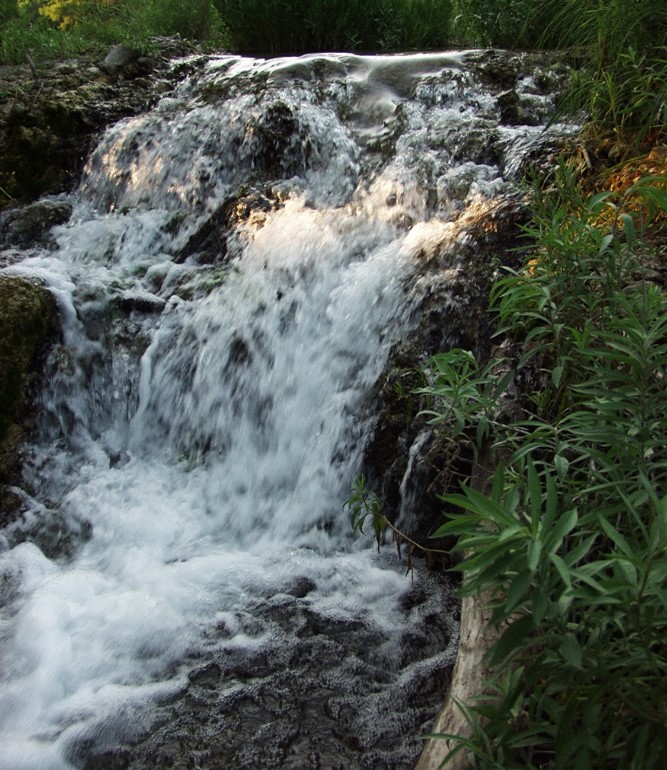
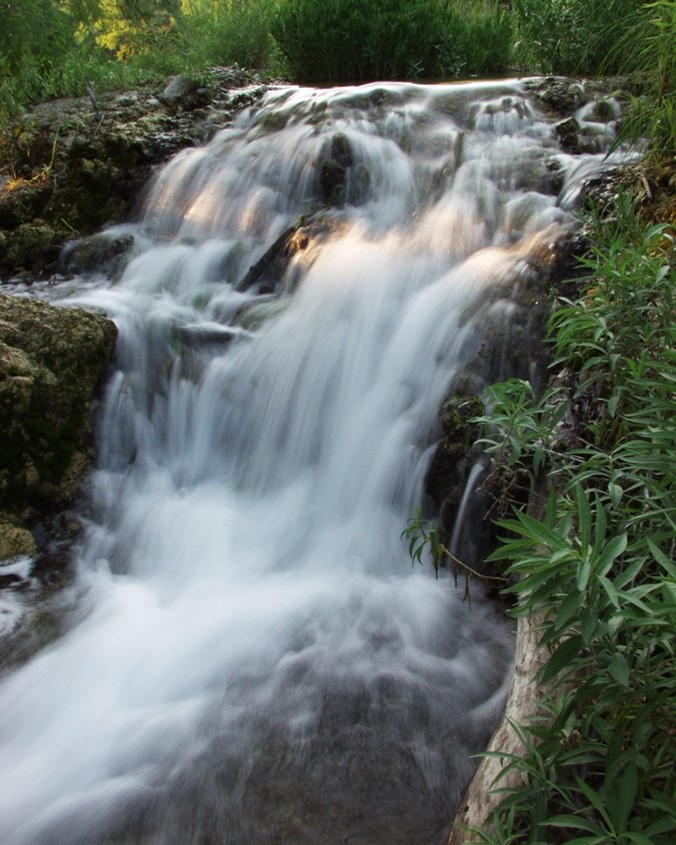
What about recording movement in the scene?
If the priority is to record the movement in the scene, the best choice is f/22 @ 1/15.
Shutter speeds also help control movement of the camera by the photographer. Camera shake can happen when we simply hold the camera. For a picture to be truly sharp, the camera needs to be kept very still during the exposure.
When hand-holding the camera, use shutter speeds that are no slower than the focal length of the lens you are using. It is recommended that you use shutter speeds with a value that is at least 1/focal length - or faster when your hand-holding the camera.
For example, you should use 1/250 if you have a 200mm lens on the camera or 1/125 with a 100mm lens. It is best not to allow the shutter speed to fall below 1/60 when hand-holding any lens.
Slow Shutter Speed
This image below was recorded with a 100mm lens at f/16 @ 1/8 without the use of a tripod.

Fast Shutter Speed

This image above was recorded with a 100mm lens at f/4 @ 1/125 while the photographer held the camera. Using a shutter speed that is at least equal to the focal length of the lens (100mm < 125) allows the photographer to handhold the camera and record a sharp image.
Using speeds slower than the focal length of your lens may require a tripod, monopod or some other camera support.
Vibration Reduction or Image Stabilization features on a lens will also help keep images sharp at slower speeds. The vibration reduction or image stabilization feature of your lens must be turned off when these lenses are used with the camera on a tripod.
Panning
This technique can be used to record a moving subject with a degree of motion blur by using a slow shutter speed. This works best for subjects that are moving across the field of view. Simply follow the path of the moving subject with the camera as it passes across the field of view, keeping the subject within the viewfinder.
The result creates a surprisingly sharp subject with a strong horizontal blur pattern of the background. This creates a sense of movement and speed.
Shutter speeds for panning are dependent on the speed of the object, the focal length of the lens and the camera to subject distance. Try using speeds near 1/15 to start and adjust from there for the desired effect.
ISO and Exposure
We know whole ISO numbers (100, 200, 400, 800, 1600, 3200…) represent one stop of exposure as you move from one to the next. Moving from one ISO to the next higher ISO number represents a one stop increase in exposure. Moving from one ISO to the next smaller ISO number represents a one stop decrease in exposure.
Exposure is established at a specified ISO. For example, f/8 @ 1/125 is not relevant without also specifying an ISO. Since ISOs, f-stops and shutter speeds combine to determine the amount of light that will reach the sensor, these settings are often referred to as the Exposure Triangle. Since all three are related to exposure, changes to one of these settings will impact one of the other two.
For example,
At 100 ISO: f/8 @ 1/125
If we change the ISO to 200, we are increasing the exposure on the sensor by one stop as the sensor is now twice as sensitive. To compensate for this change in ISO, we can either move the f-stop or the shutter speed to keep the exposure equivalent.
100 ISO: f/8 @ 1/125 ≡ 200 ISO: f/11 @ 1/125
or
100 ISO: f/8 @ 1/125 ≡ 200 ISO: f/8 @ 1/250
There may be occasions when you will want to increase the ISO to use faster shutter speeds.
For example, you are photographing a sporting event late in the day with an f/2.8 lens. The meter reading indicates an exposure of f/2.8 @ 1/125 at 100 ISO. You would prefer to use 1/500 to capture the movement of the players in action.
The difference between f/2.8 @ 1/125 and f/2.8 at 1/500 is two stops. (1/125, 1/250, 1/500)
Changing the ISO from 100 to 400 increased the exposure by two stops. (100, 200, 400)
So, f/2.8 @ 1/125 at 100 ISO ≡ f/2.8 @ 1/500 at 400 ISO.

On occasion, you may need to increase the ISO to use available f-stops.
For example, you are photographing a family late in the day with a 100mm, f/4 lens. You know that you must use a shutter speed of 1/125 because you are hand-holding the lens. The meter reading indicates an exposure of f/2 @ 1/125 at 100 ISO. You need f/4.
The difference between f/2 @ 1/125 and f/4 at 1/125 is two stops. (f/2, f/2.8, f/4)
Changing the ISO from 100 to 400 increased the exposure by two stops. (100, 200, 400)
So, f/2 @ 1/125 at 100 ISO ≡ f/4 @ 1/125 at 400 ISO.